Licensing and editions
Centro System Manager for Crestron has a free part and three licences: the Manager Licence, the User App Licence and the API Licence. A new processor runs the Manager Licence and the User App Licence on trial, so you can set up a site before you buy anything.
This page explains what each licence covers and what happens without one. To add a key, see Activate a licence. For the screen itself, see Licence.
What each part covers
| Part | What it covers | Licence |
|---|---|---|
| Free | The System and Settings pages and everything under them: locations, connections, discovered and manual devices, administrators, API keys, email, backup and restore, upgrade, logs and the licence page itself. | None needed. It always works. |
| Manager Licence | The site dashboard, location control, stays, schedules and location alerts. | A Manager Licence key |
| User App Licence | The User App, User App QR codes and touch screens set up to show a location. | A User App Licence key |
| API Licence | API keys and the MCP endpoint: other systems on the site's network reading locations and their state, sending commands, managing schedules and sending stays. | An API Licence key, with a Manager Licence or a User App Licence beside it |
A processor can have any mix of keys. The Manager Licence and the User App Licence each work on their own. The API Licence works only beside one of them.
Connections keep reporting whatever the licence. A processor with no Manager Licence still receives every location's state, so the locations appear as soon as the Manager Licence is added.
Locations are free to set up. Settings → System → Locations works with no licence, so a processor with only a User App Licence can be given its locations and touch screens.
On a processor with a User App Licence and no Manager Licence, Locations in the navigation opens a plain list of the locations with their User App QR codes, to show, copy or print. Administrators and Managers both see it. Location control and schedules still need a Manager Licence.
Stays need no licence of their own. They're part of the Manager Licence, and an Administrator turns them on with the Stays switch under Settings → Settings → General. See Stays.
Demo mode needs no licence. Its 100 demo locations show in any licence state.
The trial
A processor with no key runs the Manager Licence and the User App Licence on trial. The trial has three stages, counted from the first time Centro System Manager for Crestron ran on the processor:
| Stage | Days | Manager Licence | User App Licence |
|---|---|---|---|
| Trial | 1 to 30 | Everything works. | Users can use the User App. |
| Read-only | 31 to 60 | Locations can be seen but not controlled, schedules don't run and stays are off. | Users can't sign in. |
| After day 60 | — | Locations are hidden. | Off. |
The free part works in every stage.
While the Manager Licence is on trial or read-only, a banner on every page counts the days down. An Administrator sees an Add a key link in it.

Each licence leaves the trial when you add its key. If you add a Manager Licence key only, the User App Licence carries on through the trial stages by itself.
The API Licence has no trial. A processor without an API Licence key refuses every call an API key makes, although keys can still be made ready on Settings → Access → API keys.
The trial belongs to the processor, and there is one per processor:
- Loading the program into another slot carries on the same trial.
- A factory reset doesn't restart it, and neither does restoring a backup.
- Setting the processor's clock back doesn't extend it. The processor counts from the latest time it has seen.
What the Licence page shows
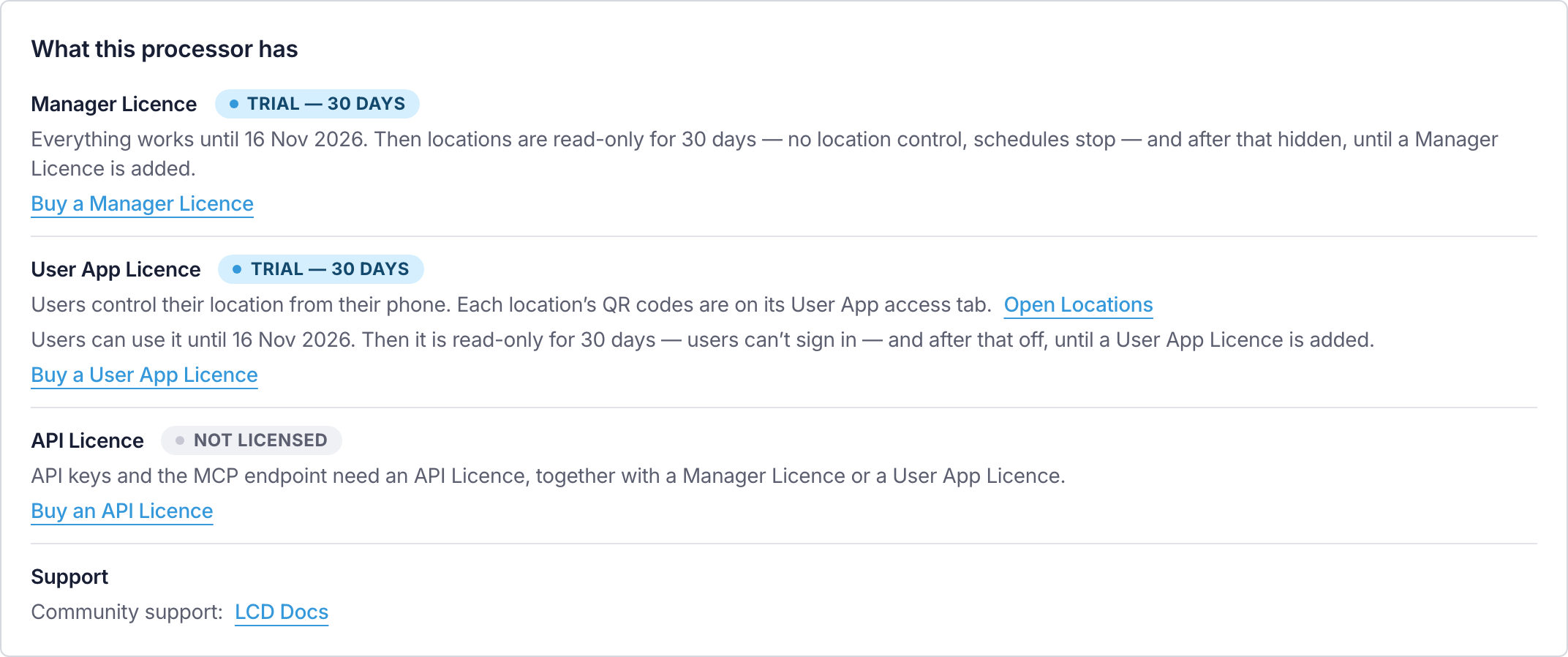
Settings → Settings → Licence lists each licence under What this processor has, with one of these states:
| State | Meaning |
|---|---|
| Active | The licence is in place and its features work. A key with no end date adds The licence never expires. |
| Trial — N days | No key yet. Its features work for the days shown. |
| Read-only | The trial has ended, or the key has ended. For the Manager Licence, locations can be seen but not controlled. For the User App Licence, users can't sign in. For the API Licence, every API key is refused, and the keys are kept. |
| Not licensed | No key, or the read-only days have ended. Locations are hidden, the User App is off, or API keys are refused. |
| Not working | API Licence only: the processor has the key, but neither a Manager Licence nor a User App Licence, so every API key is refused until one is added. |
The API Licence row also says what API keys reach with the other licences the processor has:
| Beside the API Licence | What API keys reach |
|---|---|
| A Manager Licence | Locations, location control, schedules and connection status. |
| A User App Licence only | Locations, location control and connection status. Schedules need a Manager Licence. |
| A read-only Manager Licence | Locations, schedules and connection status, read only. Nothing can be changed. |
Releases and keys
Updates are free. Any release of Centro System Manager for Crestron can be loaded on a processor, and the licences keep working on every release. See Upgrade.
Activation is per processor
A key activates a licence on one processor. It's tied to the processor's MAC address and the program slot Centro System Manager for Crestron is loaded in.
- With an internet connection, type the key on the Licence page and the processor activates it.
- With no internet connection, get a licence file for the processor's MAC address and slot from another device, and load the file on the Licence page.
To move a key to a different processor or slot, contact LCD support. You can't remove a key from a processor yourself. Once LCD has moved it, the key on the old processor turns read-only for 30 days, then off, from the first time that processor learns of the move.
A processor that activated online checks its keys once a day when it can. If it can't reach the internet, nothing changes: a network fault never removes a licence.
Activate a licence has the steps for both routes.
Locations on a processor
A licence doesn't limit the number of locations. The Licence page shows how many locations are set up and how many are recommended for the processor — up to 150 on a CP4. Above that everything keeps working, but the processor may respond more slowly.
Support
The Support line on the Licence page reads 6 hours of support included with each licence — contact LCD once the processor holds a Manager Licence key or a User App Licence key. Each of those licences brings its own 6 hours, so a processor with both has 12. An API Licence key doesn't add support.
The hours are for onboarding — setting up the site and training its staff — and last 12 months from the date you buy the licence. See Onboarding support.
A processor with neither key has community support: these pages. See Getting support.