Sign-in security
Settings → Access → Sign-in security sets how Centro System Manager for Crestron pauses sign-in after repeated failed attempts, and shows who is paused now.
Why sign-in is paused
People sign in with Crestron processor accounts. The processor locks an account after repeated failed sign-ins — out of Centro System Manager for Crestron, Toolbox, the processor's web pages and SSH — and that lock can't be lifted from here. So sign-in is paused before the processor's limit is reached. The limits on this page are the program's own, kept below the processor's.
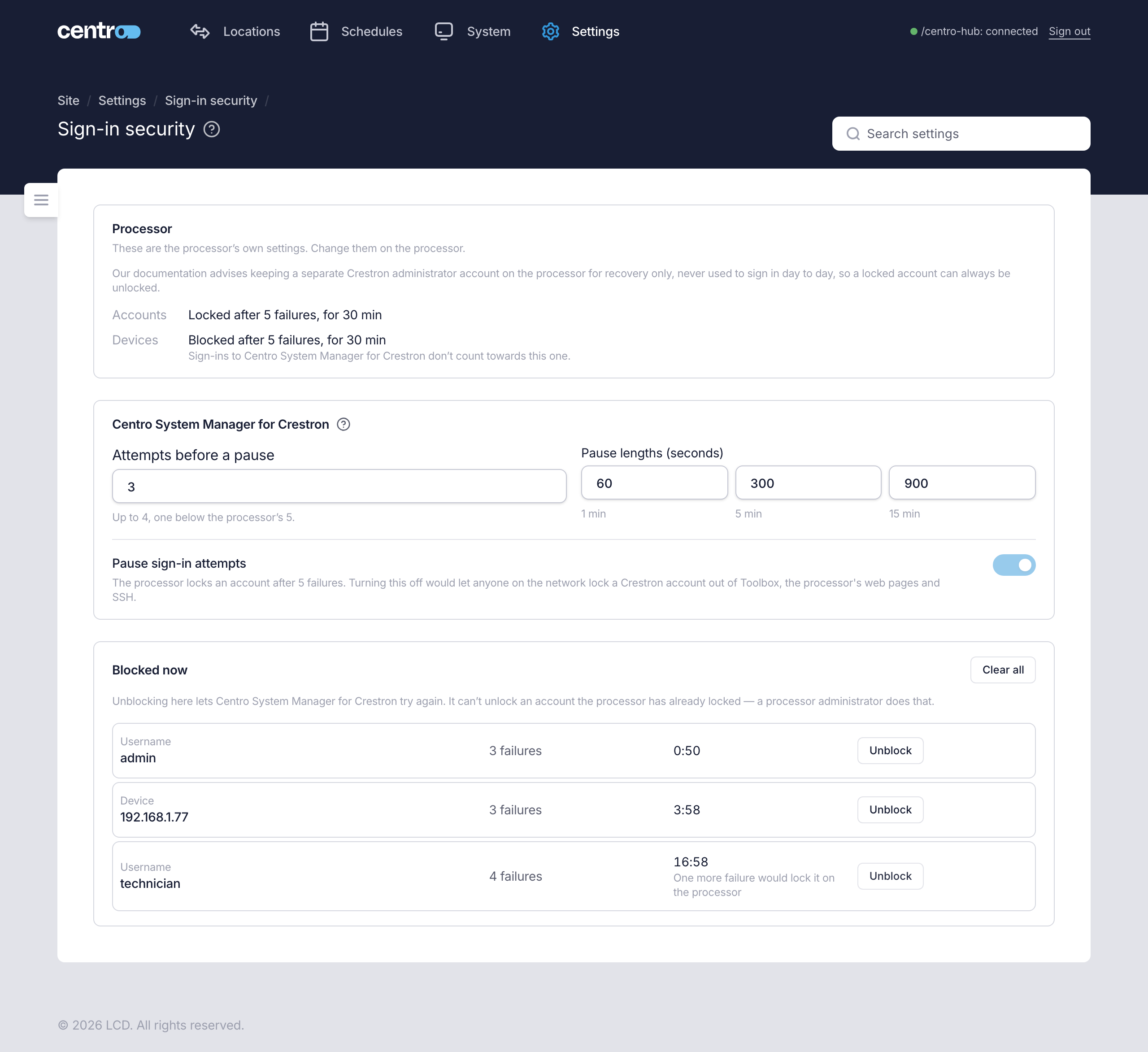
Processor
The first card shows the processor's own settings. Change them on the processor, not here.
| Line | What it shows |
|---|---|
| Accounts | After how many failures the processor locks an account, and for how long. Or Never locked. |
| Devices | After how many failures the processor blocks a device, and for how long. Or Never blocked. Sign-ins to Centro System Manager for Crestron don't count towards this one. |
On a processor whose settings can't be read, the card reads Not available on this processor. The program then assumes the processor locks an account after 5 failures and keeps its own limit at 4 or below.

Keep a separate Crestron administrator account on the processor for recovery only, never used to sign in day to day. Then a locked account can always be unlocked.
This processor
| Setting | What it does |
|---|---|
| Attempts before a pause | How many failed sign-ins, for one username or from one device, before sign-in is paused. The line beneath says how high it can go: one below the processor's own limit. It is 3 to start with. |
| Pause lengths (seconds) | Three lengths. The first pause lasts the first length. One more failure after a pause ends earns the next length, and the last one repeats. To start with they are 60, 300 and 900 seconds. Each must be between 10 seconds and 24 hours, and at least as long as the one before it. |
| Pause sign-in attempts | Turns the pauses on or off. It can be turned off only when the processor locks no account. Otherwise turning it off would let anyone on the network lock a Crestron account out of Toolbox, the processor's web pages and SSH. |
A correct password clears the count. Select Save in the bar at the foot of the page to keep changes.
What someone sees when paused
The sign-in page says that sign-in is paused — for the username, for the device, or for both — and counts down beside Try again in. Signing in works again when the countdown ends.
If the processor itself has locked the account, the sign-in page says so instead. A processor administrator can unlock it, or the person waits for the processor's lock to end.
Blocked now
Lists every username and device that is paused, with the number of failures and the time left.
| Action | What it does |
|---|---|
| Unblock | Lifts one pause, so that username or device can try again. |
| Clear all | Lifts every pause. |
Unblocking here lets the person try again. It can't unlock an account the processor has already locked — a processor administrator does that.
A row that reads One more failure would lock it on the processor is held for the processor's sake: the processor has already seen as many failures for the account as the program allows. Only time lifts it.
For the first sign-in and what to do when you're locked out, see First sign-in and Troubleshooting.